flowchart TB
    subgraph tumor["Tumor at Diagnosis"]
        direction LR
        sens["Treatment-Sensitive Cells<br/>(fraction f)"]
        res["Treatment-Resistant Cells<br/>(fraction 1-f)"]
    end

    sens -->|"Under treatment"| sens_fate["Die at rate k"]
    res -->|"Always"| res_fate["Grow at rate g"]

    sens_fate --> outcome1["Tumor shrinks initially"]
    res_fate --> outcome2["Tumor regrows eventually"]

    style sens fill:#ffcccc,stroke:#cc0000
    style res fill:#ccffcc,stroke:#00cc00
    style outcome1 fill:#e1f5fe,stroke:#01579b
    style outcome2 fill:#fff3e0,stroke:#e65100

Model Introduction
NoteTumor Burden Tutorial Series
This is Tutorial 1 of 6 in the Tumor Burden series.
| # | Tutorial | Status |
|---|---|---|
| 1 | Model Introduction (current) | You are here |
| 2 | Global Sensitivity Analysis | |
| 3 | Structural Identifiability | |
| 4 | Copula Vpop Generation | |
| 5 | MILP Calibration | |
| 6 | VCT Simulation |
1 Learning Outcomes
This tutorial introduces the Tumor Burden Model, a foundational example for understanding In Silico Clinical Trials (ISCTs). The model describes tumor dynamics during cancer chemotherapy and will be used throughout this tutorial series (Cortés-Ríos et al., 2025; Qi & Cao, 2022).
In this tutorial, you will learn:
- The clinical context: non-small cell lung cancer (NSCLC) chemotherapy
- The biological basis of tumor response: treatment-sensitive vs resistant cells
- The mathematical model equation and what each parameter represents
- How to build a Pumas model using the
@modelmacro - How to simulate typical patient dynamics
- How to visualize treatment vs control scenarios
2 Background
2.1 Clinical Context: NSCLC Chemotherapy
Non-small cell lung cancer (NSCLC) is the most common type of lung cancer, accounting for approximately 85% of all lung cancer cases. Chemotherapy remains a cornerstone of treatment, but patient responses vary dramatically:
- Some patients achieve complete response (tumor disappears)
- Some achieve partial response (tumor shrinks significantly)
- Others experience progressive disease (tumor grows despite treatment)
The central question: What determines which patients respond to treatment?
TipFrom Observation to Model
Researchers observed that tumors often show a characteristic biphasic response to chemotherapy:
- Initial shrinkage: Chemotherapy kills treatment-sensitive cells
- Eventual regrowth: Treatment-resistant cells proliferate
This observation suggests a simple but powerful model: tumors contain two distinct cell populations with different drug sensitivities.
2.2 The Two-Population Hypothesis
The tumor burden model posits that a tumor consists of two cell populations:
Biological interpretation:
| Population | Symbol | Under Treatment | Biological Basis |
|---|---|---|---|
| Sensitive cells | f | Die at rate k | Express drug targets, susceptible to chemotherapy |
| Resistant cells | 1-f | Grow at rate g | Pre-existing mutations, drug efflux pumps, stem-like properties |
This simple model captures the essence of why some patients respond better than others: patients with a higher fraction of sensitive cells (high f) will show better initial response.
3 Libraries
Load the necessary packages for this tutorial.
using Pumas
using AlgebraOfGraphics
using CairoMakie
using DataFramesMeta
using SummaryTables

using Random
using Statistics

# Set seed for reproducibility
Random.seed!(1234)
What each package does:
Pumas: Pharmacometric modeling and simulationAlgebraOfGraphics+CairoMakie: Publication-quality visualizationsDataFramesMeta: DataFrame manipulationSummaryTables: Clean rendering of data frames in documentsRandom: Julia standard library for random number generation (randn,randn!,seed!, etc.)Statistics: Julia standard library for statistics (mean,std, etc.)
4 Part 1: The Model Equation
4.1 Mathematical Formulation
The tumor burden model describes the total tumor size \(N(t)\) as the sum of two exponential terms (Qi & Cao, 2022):
\[N(t) = N_0 \cdot f \cdot e^{-k \cdot t} + N_0 \cdot (1-f) \cdot e^{g \cdot t}\]
Where:
| Symbol | Parameter | Units | Description |
|---|---|---|---|
| \(N_0\) | Initial tumor | normalized | Baseline tumor size (set to 1) |
| \(f\) | Sensitive fraction | unitless | Fraction of treatment-sensitive cells (0 to 1) |
| \(k\) | Death rate | d⁻¹ | Rate at which sensitive cells die under treatment |
| \(g\) | Growth rate | d⁻¹ | Rate at which resistant cells proliferate |
| \(t\) | Time | days | Time since treatment start |
NoteUnderstanding the Equation
Let us break down the two terms:
First term: \(N_0 \cdot f \cdot \exp{(-k \cdot t)}\) — Sensitive cell population
- Starts at \(N_0 \cdot f\) (fraction f of the initial tumor)
- Decays exponentially with rate \(k\) when treated
- Eventually approaches 0 as sensitive cells are eliminated
Second term: \(N_0 \cdot (1-f) \cdot \exp{(g \cdot t)}\) — Resistant cell population
- Starts at \(N_0 \cdot (1-f)\) (the remaining fraction)
- Grows exponentially with rate \(g\)
- Eventually dominates the total tumor
Net effect: Initial shrinkage (first term dominates) followed by regrowth (second term dominates).
4.2 Parameter Values from Literature
The parameter values come from Qi & Cao (2022), who fit this model to NSCLC clinical trial data:
# Population (typical) parameter values
pop_f = 0.27    # 27% of tumor is treatment-sensitive
pop_g = 0.0013  # Resistant cells grow ~0.13% per day
pop_k = 0.0091  # Sensitive cells die ~0.91% per day

# Inter-individual variability (standard deviations on transformed scale)
ω_f = 2.16  # High variability in sensitive fraction
ω_g = 1.57  # Moderate variability in growth rate
ω_k = 1.24  # Moderate variability in death rate

# Residual error (standard deviation)
resid_σ = 0.095
5 Part 2: Building the Pumas Model
5.1 Complete Model Definition
A Pumas model is defined using the @model macro with several blocks:
tumor_burden_model = @model begin
    @metadata begin
        desc = "Tumor Burden Model for NSCLC Chemotherapy"
        timeu = u"d"  # Time unit is days
    end

    @param begin
        # Typical values (population parameters)
        tvf ∈ RealDomain(lower = 0.0, upper = 1.0)
        tvg ∈ RealDomain(lower = 0.0)
        tvk ∈ RealDomain(lower = 0.0)

        # Inter-individual variability (diagonal covariance matrix)
        # Values on the transformed scale (logit for f, log for g and k)
        Ω ∈ PDiagDomain(3)

        # Residual error (standard deviation)
        σ ∈ RealDomain(lower = 0.0)
    end

    @random begin
        # Random effects vector (one per parameter)
        η ~ MvNormal(Ω)
    end

    @covariates treatment

    @pre begin
        # Transform random effects to individual parameters
        # f: logit-normal transformation (bounded 0-1)
        f = logistic(logit(tvf) + η[1])
        # g: log-normal transformation (positive value)
        g = tvg * exp(η[2])
        # k: log-normal transformation (positive value)
        # Additionally, treatment affects death rate:
        # treatment = false → control arm (no killing)
        # treatment = true → treatment arm (killing at rate tvk * exp(η[3]))
        k = treatment * tvk * exp(η[3])
    end

    # Initial conditions (normalized tumor = 1)
    @init begin
        N_sens = f           # Sensitive cells
        N_res = 1 - f        # Resistant cells
    end

    @dynamics begin
        # Sensitive cells: die at rate k (0 if control)
        N_sens' = -k * N_sens

        # Resistant cells: grow at rate g
        N_res' = g * N_res
    end

    @derived begin
        # Total normalized tumor size
        Nt := @. N_sens + N_res

        # Observation with residual error
        tumor_size ~ @. Normal(Nt, σ)
    end
end
PumasModel
Parameters: tvf, tvg, tvk, Ω, σ
Random effects: η
Covariates: treatment
Dynamical system variables: N_sens, N_res
Dynamical system type: Matrix exponential
Derived: tumor_size
Observed: tumor_size5.2 Understanding Each Block
Let’s examine each model block in detail.
5.2.1 The @param Block
tvf ∈ RealDomain(lower=0.0, upper=1.0): Typical value off(bounded between 0 and 1)tvg ∈ RealDomain(lower=0.0): Typical value ofg(positive)tvk ∈ RealDomain(lower=0.0): Typical value ofk(positive)Ω ∈ PDiagDomain(3): Diagonal covariance matrixσ ∈ RealDomain(lower=0.0): Residual error SD
NoteDomain Types
| Domain | Constraints | Use Case |
|---|---|---|
RealDomain() |
Any real number | Unbounded parameters |
RealDomain(lower=0.0) |
Positive only | Rates, clearances |
RealDomain(lower=0.0, upper=1.0) |
Between 0 and 1 | Fractions, bioavailability |
PDiagDomain(n) |
Positive diagonal matrix | Variance-covariance |
5.2.2 The @random Block
η ~ MvNormal(Ω) defines a vector of 3 random effects, sampled from \(\mathcal{N}(0, \Omega)\) for each virtual patient:
η[1]: affectsf(sensitive fraction)η[2]: affectsg(growth rate)η[3]: affectsk(death rate)
5.2.3 The @covariates Block
@covariates treatment declares that the model expects a treatment covariate from each Subject. This is a binary covariate (true/false) that toggles the drug effect in the @pre block — specifically, it multiplies the death rate k, so treatment = false yields k = 0 (no killing) while treatment = true yields the estimated death rate.
5.2.4 The @pre Block: Parameter Transformations
The @pre block contains the key transformations that convert population parameters and random effects into individual parameters:
f = logistic(logit(tvf) + η[1])(bounded between 0 and 1)g = tvg * exp(η[2])(positive value)k = tvk * exp(η[3])(positive value)
ImportantWhy These Transformations?
The transformations ensure:
- Parameters stay in valid ranges:
- f always between 0 and 1 (logit-normal)
- g and k always positive (log-normal)
- Symmetric variability on the transformed scale:
- A patient with η = +1 is as “far from typical” as one with η = -1
- Realistic distributions:
- Log-normal for rates (right-skewed, common in PK/PD)
- Logit-normal for fractions (appropriate for bounded parameters)
5.2.5 The @init Block
The @init block sets the initial conditions for the ODE compartments at time zero:
N_sens = f— sensitive cells start as fractionfof the normalized tumorN_res = 1 - f— resistant cells make up the remaining fraction
Together they sum to 1 (the normalized baseline tumor size \(N_0 = 1\)). Note that @init can reference variables computed in @pre — here it uses f, which means each virtual patient gets individualized initial conditions.
5.2.6 The @dynamics Block
ODE dynamics of treatment-sensitive cells:
N_sens' = -k * N_sens- Sensitive cells decrease exponentially when treated
k = 0(control) means no changek > 0(treatment) means exponential decay
ODE dynamics of treatment-resistant cells:
N_res' = g * N_res- Resistant cells always grow exponentially
- Independent of treatment
These two ODEs implement the mathematical model for the total number of cells \(N(t)\):
\[N(t) = N_0 f \exp{(-kt)} + N_0 (1-f) \exp{(gt)}\]
5.2.7 The @derived Block
The @derived block defines the model outputs and error models:
Nt := @. N_sens + N_res— the total tumor size, computed as an intermediate variable. The:=operator marks it as block-internal, soNtis not included in the simulation output.tumor_size ~ @. Normal(Nt, σ)— the error model for the observed tumor size. The~operator defines a distribution-based output: each simulated observation is drawn from a normal distribution centered onNtwith standard deviationσ. Variables defined with~appear in the simulation results.
6 Part 3: Simulating a Typical Patient
6.1 Setting Up the Simulation
Let us simulate a “typical” patient (η = 0) receiving treatment.
# Population parameters
pop_params = (
    tvf = pop_f,
    tvg = pop_g,
    tvk = pop_k,
    Ω = Diagonal([ω_f^2, ω_g^2, ω_k^2]),
    σ = resid_σ,
)

# Observation times (weekly for 18 weeks)
obs_times = 7 * (0:18)

# Create a subject for the treatment arm
subject_treatment = Subject(
    id = "treatment",
    covariates = (treatment = true,),  # Treatment arm
)

# Create a subject for the control arm
subject_control = Subject(
    id = "control",
    covariates = (treatment = false,),  # Control arm
)
Subject
ID: control
Covariates: treatment6.2 Simulating the Typical Patient
This gives individual parameters equal to population typical values:
typical_randeffs = zero_randeffs(tumor_burden_model, subject_treatment, pop_params)(η = [0.0, 0.0, 0.0],)Simulate treatment arm:
sim_treatment = simobs(
    tumor_burden_model,
    subject_treatment,
    pop_params,
    typical_randeffs;
    simulate_error = false,
    obstimes = obs_times,
)
SimulatedObservations
Simulated variables: tumor_size
Time: 0:7:126Simulate control arm:
sim_control = simobs(
    tumor_burden_model,
    subject_control,
    pop_params,
    typical_randeffs;
    simulate_error = false,
    obstimes = obs_times,
)
SimulatedObservations
Simulated variables: tumor_size
Time: 0:7:126For post-processing and plotting, we convert simulations to a DataFrame:
df_sims = DataFrame([sim_treatment, sim_control])6.3 Visualizing Treatment vs Control
# Create plot using AlgebraOfGraphics
specs_sims = data(df_sims) * mapping(
    :time => (t -> t / 7) => "Time [week]",
    :tumor_size => "Normalized tumor size",
    color = :id => renamer("treatment" => "Treatment", "control" => "Control") => "Study arm",
) * visual(Lines)
specs_reference = mapping(
    [1.0],
    linestyle = ["Baseline"] => "Reference" => AlgebraOfGraphics.scale(:RefLines),
) * visual(HLines)
draw(specs_sims + specs_reference, scales(RefLines = (; palette = [:dash])))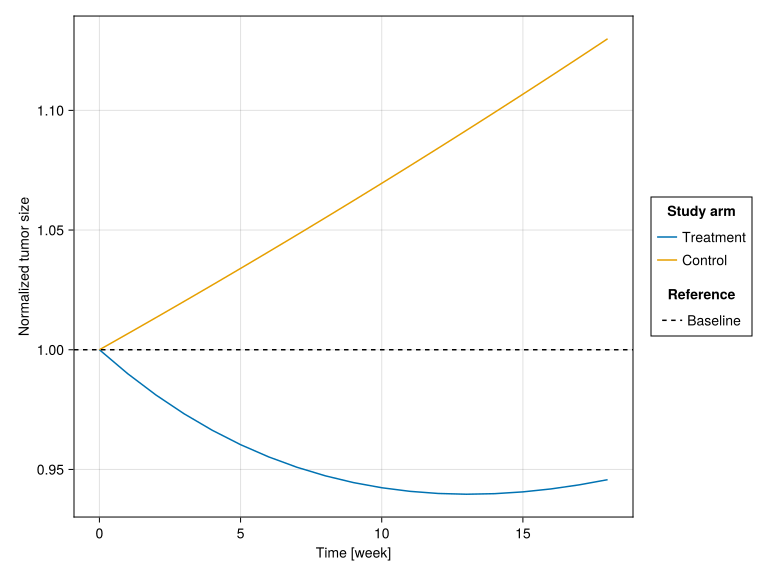
NoteInterpreting the Curves
Treatment arm:
- Weeks 0 - ~13: Tumor shrinks as treatment kills sensitive cells (27% of initial tumor)
- Days ~13 - 18: Tumor regrows as resistant cells (73% of initial tumor) continue proliferating
- Nadir (minimum): Occurs when the declining sensitive population equals the growing resistant population
Control arm:
- No killing of any cells
- Both populations grow at their respective rates (but
fdoesn’t affect control sincek = 0) - Exponential growth dominated by the larger resistant population
7 Part 4: Understanding the Dynamics
7.1 Analytical Solution
For deeper understanding, let us examine the analytical solution.
Nadir (minimum tumor size) occurs when \(N'(t) = 0\), i.e., when \[ -k f \exp{(-kt)} + g (1-f) \exp{(gt)} = 0. \]
Solving this equation yields
\[ t = \frac{\ln{(kf / (g(1-f)))}}{k + g}. \]
Thus, time to nadir for a typical patient is (in days):
t_nadir = log(pop_k * pop_f / (pop_g * (1 - pop_f))) / (pop_k + pop_g)91.46995902992803Let us compute the tumor size at nadir and after 18 weeks for a typical patient:
sim_nadir = simobs(
    tumor_burden_model,
    subject_treatment,
    pop_params,
    typical_randeffs;
    simulate_error = false,
    obstimes = [0, t_nadir, 18 * 7]
)
simple_table(
    DataFrame(sim_nadir),
    [:time => "Time [day]", :tumor_size => "Tumor size"],
)| Time [day] | Tumor size |
| 0 | 1 |
| 91.5 | 0.94 |
| 126 | 0.946 |
We see that this typical patient would not achieve “complete response” of a tumor size < 0.14.
7.2 Sensitivity to Parameters
How do the model outputs change with different parameter values?
# Create DataFrame for all f values
f_values = [0.1, 0.27, 0.5, 0.8]

# Build DataFrame with all trajectories
df_sensitivity = mapreduce(vcat, f_values) do f
    sim = simobs(
        tumor_burden_model,
        subject_treatment,
        merge(pop_params, (; tvf = f)),
        typical_randeffs;
        simulate_error = false,
        obstimes = obs_times,
    )
    select(DataFrame(sim), [:time, :tumor_size, :f])
end

# Create plot using AlgebraOfGraphics
specs_sims = data(df_sensitivity) * mapping(
    :time => (t -> t / 7) => "Time [week]",
    :tumor_size => "Normalized tumor size",
    color = :f => (x -> string(round(100 * x; digits = 1), " %")) => "Sensitive fraction",
) * visual(Lines)
specs_references = mapping(
    [1.0, 0.14],
    linestyle = ["Baseline", "Complete response"] => "Reference" => AlgebraOfGraphics.scale(:RefLines),
) * visual(HLines)
draw(specs_sims + specs_references, scales(RefLines = (; palette = [:dash, :dot])))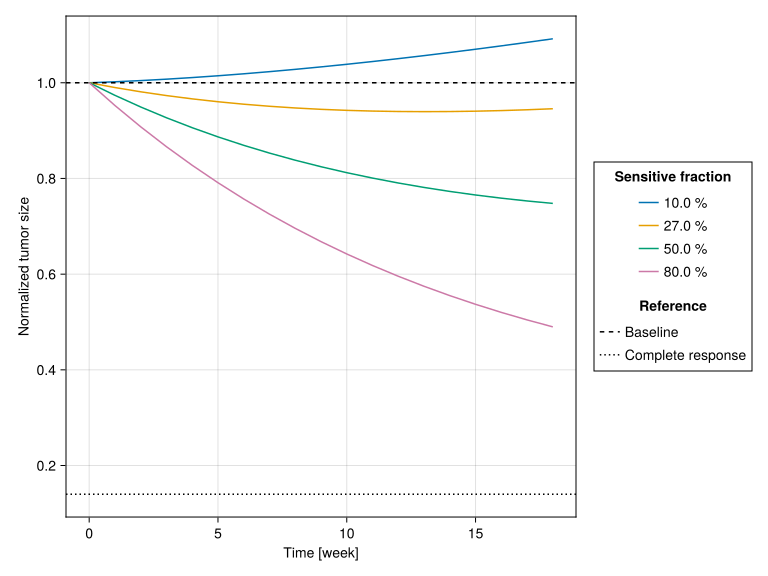
f) on tumor dynamics. Higher sensitive fraction leads to deeper initial response and longer time to regrowth.
TipClinical Insight
The parameter f (sensitive fraction) is the primary driver of treatment response:
| f value | Clinical interpretation |
|---|---|
| < 0.15 | Poor responder — most cells are resistant from the start |
| 0.25-0.35 | Typical responder — moderate initial response, eventual progression |
| > 0.50 | Good responder — deep initial response, delayed progression |
| > 0.85 | Excellent responder — may achieve durable complete response |
This explains why f dominates the global sensitivity analysis (Tutorial 2).
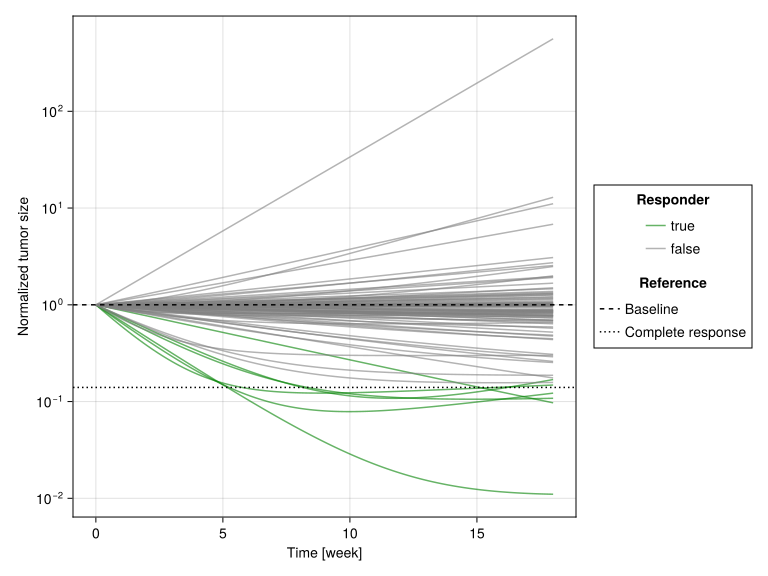
8 Part 5: Population Variability Preview
8.1 Simulating Multiple Patients
Let us generate trajectories for a small sample of virtual patients.
patients = [Subject(; id, covariates = (; treatment = true)) for id in 1:100]

# Simple sampling (not using copulas yet - that's Tutorial 4)
# Just to show variability concept
patients_sims = simobs(
    tumor_burden_model,
    patients, pop_params;
    obstimes = 0:(7 * 18),
    simulate_error = false,
)
Simulated population (Vector{<:Subject})
Simulated subjects: 100
Simulated variables: tumor_sizeLet us inspect the variability of the simulated values of parameters f, g and k:
fgk_sims = postprocess(patients_sims) do generated, _
    (; f = only(unique(generated.f)), g = only(unique(generated.g)), k = only(unique(generated.k)))
end |> DataFrame
table_one(fgk_sims)| Total | |
| f | |
| Mean (SD) | 0.445 (0.351) |
| Median [Min, Max] | 0.405 [0.00045, 0.995] |
| g | |
| Mean (SD) | 0.00315 (0.00642) |
| Median [Min, Max] | 0.000958 [3.08e-5, 0.0502] |
| k | |
| Mean (SD) | 0.0168 (0.0206) |
| Median [Min, Max] | 0.00898 [0.000233, 0.107] |
tumor_size_df = @chain DataFrame(patients_sims) begin
    @select :id :time :tumor_size
    @groupby :id
    @transform! :responder = minimum(:tumor_size) < 0.14
end

specs_sims = data(tumor_size_df) * mapping(
    :time => (t -> t / 7) => "Time [week]",
    :tumor_size => "Normalized tumor size",
    color = :responder => sorter([true, false]) => "Responder",
    group = :id
) * visual(Lines; alpha = 0.6)
specs_references = mapping(
    [1.0, 0.14],
    linestyle = ["Baseline", "Complete response"] => "Reference" => AlgebraOfGraphics.scale(:RefLines),
) * visual(HLines)
draw(
    specs_sims + specs_references,
    scales(Color = (; palette = [:green, :gray]), RefLines = (; palette = [:dash, :dot]));
    axis = (; yscale = log10),
)
ImportantLooking Ahead
This preview shows why we need:
Systematic analysis: We need to understand which parameters matter most (Tutorial 2: GSA) and whether they can be estimated (Tutorial 3: Identifiability).
Copula sampling (Tutorial 4): The random sampling above ignores parameter correlations. In reality, patients with high
f(fraction of treatment-sensitive cells) tend to have lowg(growth rate of treatment-resistant cells).Calibration (Tutorial 5): The response rate from random sampling may not match real clinical trial data.
9 Summary
9.1 Key Concepts
The tumor burden model describes cancer response to chemotherapy using two cell populations:
- Treatment-sensitive cells (fraction
f) that die at ratek - Treatment-resistant cells (fraction
1-f) that grow at rateg
- Treatment-sensitive cells (fraction
The mathematical model: \[N(t) = N_0 \cdot f \cdot e^{-k \cdot t} + N_0 \cdot (1-f) \cdot e^{g \cdot t}\]
Parameters from clinical data:
f = 0.27(27% sensitive),g = 0.0013d⁻¹,k = 0.0091d⁻¹
Pumas model structure:
@param: Population parameters@random: Inter-individual variability@pre: Parameter transformations (logit-normal forf, log-normal forgandk)@dynamics: ODE system@derived: Observable outputs
Clinical insight:
- The sensitive fraction (
f) is the primary driver of response - Population variability creates diverse outcomes
- The sensitive fraction (
9.2 What’s Next
In Tutorial 2: Global Sensitivity Analysis, we will:
- Learn what global sensitivity analysis is and why it differs from local sensitivity
- Understand first-order and total-order sensitivity indices
- Run GSA using Sobol and eFAST methods in Pumas
- Discover that
fdominates but the importance ofgandkvaries across timepoints
9.3 Quick Reference: Key Functions
| Function | Purpose |
|---|---|
@model begin ... end |
Define a Pumas model |
Subject(id, covariates, time) |
Create a simulation subject |
simobs(model, subject, params, randeffs) |
Simulate observations |
logit(x) / logistic(x) |
Bounded parameter transformations |
9.4 References
Cortés-Ríos, J., Magee, M., Sher, A., Jusko, W. J., & Desikan, R. (2025). A step-by-step workflow for performing in silico clinical trials with nonlinear mixed effects models. CPT: Pharmacometrics & Systems Pharmacology. https://doi.org/10.1002/psp4.70122
Qi, T., & Cao, Y. (2022). Virtual clinical trials: A tool for predicting patients who may benefit from treatment beyond progression with pembrolizumab in non-small cell lung cancer. CPT: Pharmacometrics & Systems Pharmacology, 12(2), 236–249. https://doi.org/10.1002/psp4.12896