flowchart LR
    A["Build Model"] --> B["Run GSA"]
    B --> C{"Parameter<br/>Influential?"}
    C -->|Yes| D["Estimate<br/>from data"]
    C -->|No| E["Fix to<br/>literature value"]
    D --> F["Run ISCT"]
    E --> F

    style B fill:#fff3e0,stroke:#e65100
    style C fill:#e3f2fd,stroke:#1565c0

Global Sensitivity Analysis
NoteTumor Burden Tutorial Series
This is Tutorial 2 of 6 in the Tumor Burden series.
| # | Tutorial | Status |
|---|---|---|
| 1 | Model Introduction | ✓ Complete |
| 2 | Global Sensitivity Analysis (current) | You are here |
| 3 | Structural Identifiability | |
| 4 | Copula Vpop Generation | |
| 5 | MILP Calibration | |
| 6 | VCT Simulation |
1 Learning Outcomes
Global Sensitivity Analysis (GSA) is a powerful technique for understanding how model outputs depend on input parameters. In the context of In Silico Clinical Trials (ISCTs), GSA helps identify which parameters most influence treatment outcomes (Cortés-Ríos et al., 2025).
In this tutorial, you will learn:
- What global sensitivity analysis is and why it differs from local sensitivity
- The difference between first-order and total-order sensitivity indices
- How to run GSA using Sobol and eFAST methods in Pumas
- How to interpret and visualize sensitivity analysis results
- How to use GSA to guide model development and ISCT design
TipWhat We’ll Discover
By the end of this tutorial, we’ll find that for the tumor burden model:
- The sensitive fraction (f) dominates at all timepoints, but especially at week 18 (Sₜ ≈ 0.84)
- The death rate (k) — despite controlling treatment efficacy — has minimal impact on final outcomes (Sₜ ≈ 0.07)
- Parameter interactions are minimal — the model behaves nearly additively
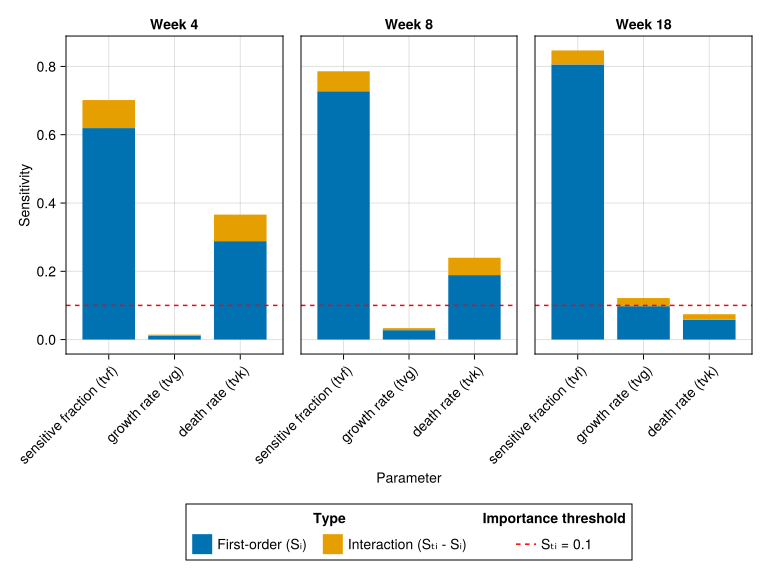
But here’s the key insight: when we compare GSA across different timepoints, we’ll discover that k’s influence is 5× stronger at week 4 (Sₜ ≈ 0.37) than at week 18. Meanwhile, g emerges from negligible (0.01) to influential (0.12) as resistant cells drive late-stage tumor growth. The parameters that matter depend entirely on when you measure — a critical lesson for clinical trial design!
2 Prerequisites
This tutorial uses the Tumor Burden Model from Tutorial 1. The model describes tumor dynamics with parameters:
- f (sensitive fraction): What fraction of tumor cells respond to treatment
- g (growth rate): How fast resistant cells proliferate
- k (death rate): How fast sensitive cells die under treatment
For model details, see Tutorial 1.
3 Background
3.1 What is Sensitivity Analysis?
Sensitivity analysis quantifies how variation in model outputs can be attributed to variation in model inputs. It answers two fundamental questions:
- Which parameters most affect the output? — Identify the key drivers of model behavior
- Do parameters interact? — Understand if combined parameter effects differ from individual effects
NoteLocal vs Global Sensitivity Analysis
| Aspect | Local Sensitivity | Global Sensitivity |
|---|---|---|
| Approach | Infinitesimal perturbation of one parameter around a base value | Exploration of entire parameter space simultaneously |
| Information | Derivative (slope) at one point | Variance decomposition across full range |
| Interactions | Not detectable | Explicitly quantified |
| Computational cost | Low | High |
| Robustness | Depends on base point | Comprehensive |
Local sensitivity tells you what happens if you slightly change one parameter while holding others fixed. Global sensitivity tells you what happens across the entire plausible parameter space.
3.2 Why GSA in the ISCT Workflow?
In the ISCT workflow (Cortés-Ríos et al., 2025), GSA serves several important purposes:
- Model understanding: Identify which biological mechanisms drive treatment response
- Parameter prioritization: Focus estimation efforts on influential parameters
- Experimental design: Guide what to measure in clinical studies
- Model simplification: Identify parameters that can be fixed without affecting predictions
- Uncertainty propagation: Understand which parameter uncertainties matter most
3.3 Variance-Based Sensitivity Indices
The most common GSA approach is variance-based sensitivity analysis (Sobol’, 2001). It decomposes the total variance \(V[Y]\) of output \(Y\) into contributions \(V[\mathbb{E}[Y|X_i]]\) from each input parameter \(X_i\).
3.3.1 First-Order Sensitivity Index (S₁)
The first-order index \(S_i\) measures the direct (main) effect of a single parameter \(X_i\) on output \(Y\):
\[S_i = \frac{V[\mathbb{E}[Y|X_i]]}{V[Y]}\]
Interpretation: The fraction of output variance explained by varying parameter \(X_i\) alone, averaging over all other parameters.
- \(S_i = 0\): Parameter has no direct effect
- \(S_i = 1\): Parameter alone explains all output variance
3.3.2 Total-Order Sensitivity Index (Sₜ)
The total-order index \(S_{ti}\) measures the total effect of a parameter \(X_i\), including all interactions with other parameters (Saltelli et al., 2010):
\[S_{ti} = \frac{\mathbb{E}[V[Y|X_{\sim i}]]}{V[Y]} = 1 - \frac{V[\mathbb{E}[Y|X_{\sim i}]]}{V[Y]}\]
where \(X_{\sim i}\) represents all parameters except \(X_i\).
Interpretation: The fraction of output variance explained by varying parameter \(X_i\), including all its interactions with other parameters.
TipKey Insight: Detecting Interactions
The difference between total-order and first-order indices reveals parameter interactions:
\[\text{Interaction effect} = S_{ti} - S_i\]
| Situation | Meaning |
|---|---|
| \(S_{ti} \approx S_i\) | Parameter acts independently |
| \(S_{ti} > S_i\) | Parameter has important interactions with others |
| \(\sum S_i \approx 1\) | Model is approximately additive |
| \(\sum S_i < 1\) | Significant interactions present |
3.4 GSA Methods: Sobol vs eFAST
Two popular methods for computing sensitivity indices:
| Method | Full Name | Approach | Reference |
|---|---|---|---|
| Sobol | Sobol indices | Monte Carlo sampling | Sobol’ (2001) |
| eFAST | Extended Fourier Amplitude Sensitivity Test | Fourier analysis | Saltelli et al. (1999) |
Practical guidance:
- Sobol: Quasi-Monte Carlo-based. Asymptotically unbiased with well-characterized convergence. Can optionally compute higher-order interaction indices (e.g., second-order interactions), though by default only \(S_i\) and \(S_{ti}\) are computed. Requires larger sample sizes for stable estimates.
- eFAST: Fourier-based. More sample-efficient at small sample sizes, but introduces a small systematic bias from spectral aliasing that does not fully vanish with increasing \(N\) (Saltelli et al., 2008). Computes \(S_i\) and \(S_{ti}\) only.
- Both methods compute \(S_i\) and \(S_{ti}\). eFAST is typically more sample-efficient for these. Choose Sobol when you need higher-order interaction indices or more accurate results at the expense of larger sample budgets.
4 Libraries
using Pumas
using GlobalSensitivity
using AlgebraOfGraphics
using CairoMakie
using DataFramesMeta
using SummaryTables

using Statistics
What each package does:
Pumas: Pharmacometric modeling and simulationGlobalSensitivity: Provides Sobol and eFAST methods (Sobol, eFAST)AlgebraOfGraphics+CairoMakie: Publication-quality visualizationsDataFramesMeta: Organize and manipulate data framesSummaryTables: Clean rendering of data frames in documentsStatistics: Julia standard library for statistics (mean,std, etc.)
5 Part 1: Model Setup for GSA
5.1 Tumor Burden Model with GSA Endpoints
For GSA, we need to define output endpoints that summarize the model behavior. We do this using the @observed block:
tumor_burden_model_gsa = @model begin
    @metadata begin
        desc = "Tumor Burden Model for NSCLC Chemotherapy"
        timeu = u"d"  # Time unit is days
    end

    @param begin
        # Typical values (population parameters)
        tvf ∈ RealDomain(lower = 0.0, upper = 1.0)
        tvg ∈ RealDomain(lower = 0.0)
        tvk ∈ RealDomain(lower = 0.0)

        # Inter-individual variability (diagonal covariance matrix)
        # Values on the transformed scale (logit for f, log for g and k)
        Ω ∈ PDiagDomain(3)

        # Residual error (standard deviation)
        σ ∈ RealDomain(lower = 0.0)
    end

    @random begin
        # Random effects vector (one per parameter)
        η ~ MvNormal(Ω)
    end

    @covariates treatment

    @pre begin
        # Transform random effects to individual parameters
        # f: logit-normal transformation (bounded 0-1)
        f = logistic(logit(tvf) + η[1])
        # g: log-normal transformation (positive value)
        g = tvg * exp(η[2])
        # k: log-normal transformation (positive value)
        # Additionally, treatment affects death rate:
        # treatment = false → control arm (no killing)
        # treatment = true → treatment arm (killing at rate tvk * exp(η[3]))
        k = treatment * tvk * exp(η[3])
    end

    # Initial conditions (normalized tumor = 1)
    @init begin
        N_sens = f           # Sensitive cells
        N_res = 1 - f        # Resistant cells
    end

    @dynamics begin
        # Sensitive cells: die at rate k (0 if control)
        N_sens' = -k * N_sens

        # Resistant cells: grow at rate g
        N_res' = g * N_res
    end

    @derived begin
        # Total normalized tumor size
        Nt := @. N_sens + N_res

        # Observation with residual error
        tumor_size ~ @. Normal(Nt, σ)
    end

    @observed begin
        # Endpoint for GSA: Total normalized tumor size at the final time point
        final_tumor = last(tumor_size)
    end
end
PumasModel
Parameters: tvf, tvg, tvk, Ω, σ
Random effects: η
Covariates: treatment
Dynamical system variables: N_sens, N_res
Dynamical system type: Matrix exponential
Derived: tumor_size
Observed: final_tumor, tumor_size
NoteUnderstanding the
@observed Block
The @observed block defines outputs for GSA.
- Often these outputs are scalar values (single number per simulation), derived from the time course using functions such as
last(), indexing, or summary statistics. - If these outputs are vectors, every vector element is treated as a separate output and sensitivity analysis is performed for all of them.
- Unlike distributions in
@derived, values in@observedare not used for model fitting.
For the tumor model:
final_tumor: Tumor size at the last observation time (treatment endpoint)
Common scalar endpoints for GSA:
last(variable)- value at final timepointvariable[index]- value at specific timepointmaximum(variable)- peak valueminimum(variable)- nadir value
6 Part 2: Running GSA
6.1 Create a Subject for Simulation
GSA requires a “subject” to provide time points and covariates:
subject = Subject(
    id = 1,
    covariates = (; treatment = true),  # Treatment arm (drug active)
    time = [0, 18 * 7], # 18 weeks of treatment
)
Subject
ID: 1
Covariates: treatment6.2 Define Parameter Ranges
GSA explores parameters within specified bounds. These should cover the plausible physiological range:
# Lower bounds for typical values
p_range_low = (
    tvf = 0.05,    # At least 5% sensitive
    tvg = 0.0005,  # Minimum growth rate
    tvk = 0.002,    # Minimum death rate
)

# Upper bounds for typical values
p_range_high = (
    tvf = 0.95,   # At most 95% sensitive
    tvg = 0.005,  # Maximum growth rate
    tvk = 0.05,    # Maximum death rate
)
6.3 Base Parameters and Constant Coefficients
We need base parameter values and must fix the random effect variance to make simulations deterministic:
base_params = (
    tvf = 0.27,
    tvg = 0.0013,
    tvk = 0.0091,
    Ω = Diagonal(zeros(3)),  # No variance → deterministic
    σ = 0.0,                 # No residual noise
)
(tvf = 0.27, tvg = 0.0013, tvk = 0.0091, Ω = [0.0 0.0 0.0; 0.0 0.0 0.0; 0.0 0.0 0.0], σ = 0.0)
ImportantWhy Fix Ω and σ?
For GSA, we want to understand how population-level parameters (tvf, tvg, tvk) affect outputs. If we allowed Ω to be large:
- Random effects η would vary between simulations
- This would add noise unrelated to parameter sensitivity
- Sensitivity indices would be contaminated
By specifying constantcoef = (:Ω, :σ) (a tuple of symbols), we tell GSA to hold these parameters constant at their base_params values. This gives deterministic simulations where only the parameters of interest vary.
Note: constantcoef expects a tuple of parameter names (symbols), not a NamedTuple with values. The actual values come from base_params.
6.4 Run eFAST (Fast Initial Analysis)
eFAST is faster than Sobol, and hence good for initial exploration:
gsa_efast = gsa(
    tumor_burden_model_gsa,        # Model
    subject,                       # Subject with time points
    base_params,                   # Base parameter values
    eFAST(),                       # Method (from GlobalSensitivity)
    [:final_tumor],                # Outputs to analyze
    p_range_low,                   # Lower bounds
    p_range_high;                  # Upper bounds
    constantcoef = (:Ω, :σ),       # Parameters NOT to vary (tuple of symbols)
    samples = 1_000                # Number of samples
)
6.5 Extract Results
First-order indices:
simple_table(
    gsa_efast.first_order,
    [:dv_name => "Output", :tvf, :tvg, :tvk],
)| Output | tvf | tvg | tvk |
| final_tumor | 0.802 | 0.0954 | 0.0564 |
Total-order indices:
simple_table(
    gsa_efast.total_order,
    [:dv_name => "Output", :tvf, :tvg, :tvk],
)| Output | tvf | tvg | tvk |
| final_tumor | 0.848 | 0.124 | 0.0747 |
6.6 Run Sobol (More Accurate)
For publication-quality results, use the Sobol method.
gsa_sobol = gsa(
    tumor_burden_model_gsa,
    subject,
    base_params,
    Sobol(),
    [:final_tumor],
    p_range_low,
    p_range_high;
    constantcoef = (:Ω, :σ),
    samples = 2^10
)
First-order indices:
simple_table(
    gsa_sobol.first_order,
    [:dv_name => "Output", :tvf, :tvg, :tvk],
)| Output | tvf | tvg | tvk |
| final_tumor | 0.806 | 0.0978 | 0.0583 |
Total-order indices:
simple_table(
    gsa_sobol.total_order,
    [:dv_name => "Output", :tvf, :tvg, :tvk],
)| Output | tvf | tvg | tvk |
| final_tumor | 0.847 | 0.122 | 0.0742 |
WarningWhy 2^n Samples?
Sobol’s method uses Sobol sequences (quasi-random low-discrepancy sequences) in the unit hypercube rather than pseudo-random numbers to fill the parameter space.
When you use exactly \(2^n\) points, the Sobol sequence guarantees perfect stratification: the unit hypercube is partitioned into \(2^n\) equal sub-intervals along each dimension, and exactly one point falls in each interval (in 1D; in higher dimensions, the balance is maintained across projections). This ensures uniform, gap-free coverage of the parameter space.
If you use a non-power-of-2 number (e.g., 1000 instead of 1024):
- The first 512 (= 2^9) points are perfectly stratified
- The remaining 488 points partially fill the next stratification level
- This creates uneven coverage — some regions get extra samples while others remain sparse
Optimal convergence rate of quasi-Monte Carlo integral approximations based on Sobol sequences is only achieved with even coverage, i.e., with \(2^n\) samples.
Thus using non-power-of-2 number of samples in Sobol’s method means:
- Sensitivity indices estimates have higher error than necessary for the computational cost
- Sensitivity index estimates may be biased or unstable
- Confidence intervals from bootstrapping become less reliable
7 Part 3: Interpreting Results
7.1 Compile Results into a Single DataFrame
For easier downstream analysis, we combine the first-order and total-order indices in a single data frame.
gsa_sobol_first_order = stack(
    gsa_sobol.first_order,
    Not(:dv_name);
    variable_name = :parameter,
    value_name = :first_order,
)
gsa_sobol_total_order = stack(
    gsa_sobol.total_order,
    Not(:dv_name);
    variable_name = :parameter,
    value_name = :total_order,
)
gsa_sobol_df = outerjoin(
    gsa_sobol_first_order,
    gsa_sobol_total_order; on = [:dv_name, :parameter],
)

# Compute interaction (difference between total- and first-order indices)
@rtransform! gsa_sobol_df :interaction = :total_order - :first_order

simple_table(
    gsa_sobol_df,
    [
        :dv_name => "Output",
        :parameter => "Parameter",
        :first_order => "First order",
        :total_order => "Total order",
        :interaction => "Interaction",
    ],
)| Output | Parameter | First order | Total order | Interaction |
| final_tumor | tvf | 0.806 | 0.847 | 0.041 |
| final_tumor | tvg | 0.0978 | 0.122 | 0.0238 |
| final_tumor | tvk | 0.0583 | 0.0742 | 0.0159 |
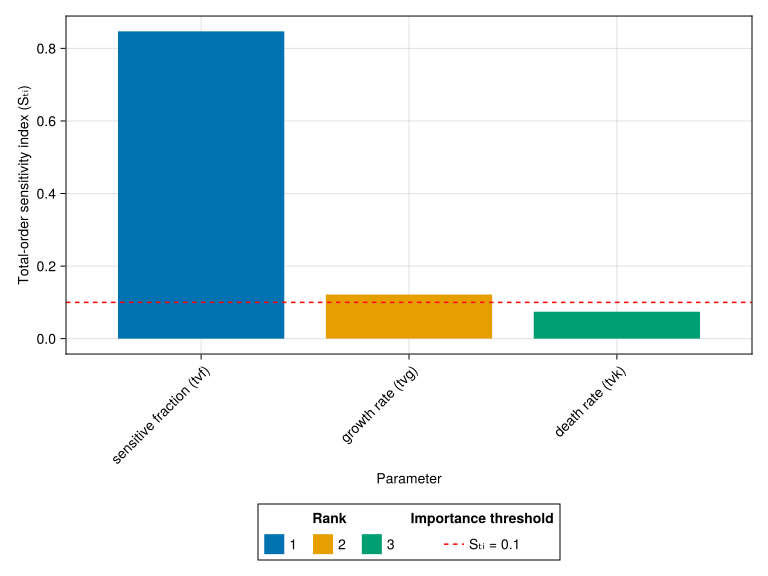
7.2 Rank Parameters by Importance
For each output, we rank parameters by total-order index:
ranked_gsa_sobol_df = @chain gsa_sobol_df begin
    @groupby [:dv_name]
    @transform :rank = sortperm(:total_order; rev = true)
    sort!(_, [:dv_name, :rank])
end

simple_table(
    ranked_gsa_sobol_df,
    [
        :dv_name => "Output",
        :parameter => "Parameter",
        :first_order => "First order",
        :total_order => "Total order",
        :interaction => "Interaction",
        :rank => "Rank",
    ],
)| Output | Parameter | First order | Total order | Interaction | Rank |
| final_tumor | tvf | 0.806 | 0.847 | 0.041 | 1 |
| final_tumor | tvg | 0.0978 | 0.122 | 0.0238 | 2 |
| final_tumor | tvk | 0.0583 | 0.0742 | 0.0159 | 3 |
7.3 Identify Influential Parameters
We consider parameters with total-order index ≥ 0.1 as influential:
threshold = 0.1
influential_gsa_sobol_df = @chain gsa_sobol_df begin
    @rtransform :interpretation = :total_order >= threshold ? "INFLUENTIAL" : "minor"
    sort!(_, [:dv_name, order(:total_order; rev = true)])
end

simple_table(
    influential_gsa_sobol_df,
    [
        :dv_name => "Output",
        :parameter => "Parameter",
        :first_order => "First order",
        :total_order => "Total order",
        :interaction => "Interaction",
        :interpretation => "Interpretation",
    ],
)| Output | Parameter | First order | Total order | Interaction | Interpretation |
| final_tumor | tvf | 0.806 | 0.847 | 0.041 | INFLUENTIAL |
| final_tumor | tvg | 0.0978 | 0.122 | 0.0238 | INFLUENTIAL |
| final_tumor | tvk | 0.0583 | 0.0742 | 0.0159 | minor |
NoteInterpretation of Results
Looking at the final_tumor output:
- sensitive fraction (
tvf) has the highest total-order index (~0.84) — the dominant driver of final tumor size - growth rate (
tvg) is second (~0.12) — influences resistant cell regrowth - death rate (
tvk) is minor (~0.07) — less influential for the final outcome
Biological interpretation:
- The fraction of treatment-sensitive cells is the primary determinant of long-term outcome
- Patients with high fraction of treatment-sensitive cells have more cells killed by treatment → smaller final tumors
- Growth rate matters because resistant cells eventually dominate the tumor
- Death rate has less impact on final size because it only affects the sensitive population, which is eventually eliminated regardless of the death rate
Why is sensitive fraction dominant?
The model: \(N(t) = N_0 \cdot f \cdot e^{-kt} + N_0 \cdot (1-f) \cdot e^{gt}\)
At late times, the first term (sensitive cells) → 0 regardless of k, so final tumor ≈ \(N_0 \cdot (1-f) \cdot e^{gT}\). This depends strongly on f and g, but not k.
8 Part 4: Visualization
8.1 Bar Chart: First-Order vs Total-Order
# Create long data frame for AlgebraOfGraphics
long_df = @chain gsa_sobol_df begin
    @select :parameter :first_order :interaction
    stack(_, ["first_order", "interaction"]; variable_name = "type", value_name = "index")
end

specs_gsa = data(long_df) * mapping(
    :parameter => renamer("tvf" => "sensitive fraction (tvf)", "tvg" => "growth rate (tvg)", "tvk" => "death rate (tvk)") => "Parameter",
    :index => "Sensitivity",
    stack = :parameter,
    color = :type => renamer("first_order" => "First-order (Sᵢ)", "interaction" => "Interaction (Sₜᵢ - Sᵢ)") => "Type",
) * visual(BarPlot)
specs_threshold = mapping(
    [threshold],
    color = "Sₜᵢ = 0.1" => "Importance threshold" => AlgebraOfGraphics.scale(:ColorLines),
) * visual(HLines; linestyle = :dash)
draw(
    specs_gsa + specs_threshold,
    AlgebraOfGraphics.scales(; ColorLines = (; palette = [:red]));
    legend = (; position = :bottom),
    axis = (; xticklabelrotation = π / 4),
)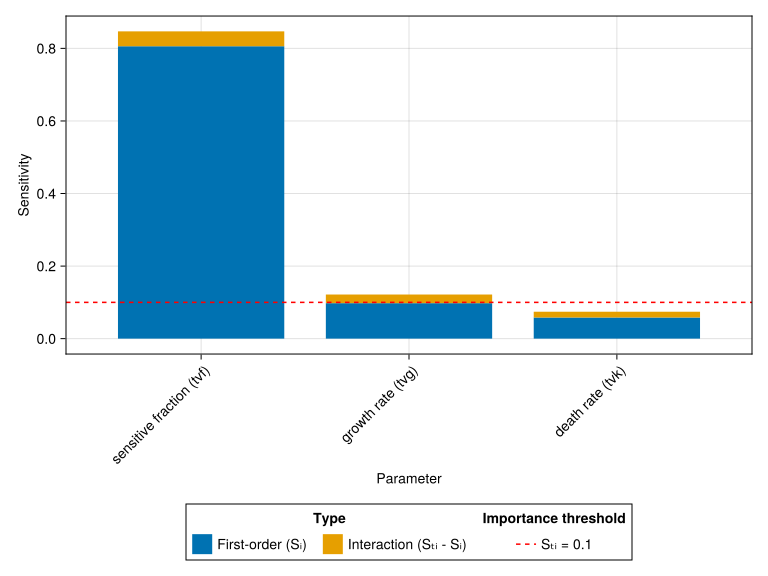
NoteInterpreting the Sensitivity Bar Chart
How to read this plot:
- Bar length = total sensitivity (Sₜᵢ) of each parameter
- Blue Bar = first-order effect (Sᵢ) — direct influence of the parameter alone
- Yellow Bar = interaction contribution (Sₜᵢ - Sᵢ) — influence through parameter interactions
Key findings:
f (sensitive fraction) has the highest sensitivity (Sₜᵢ ≈ 0.84), meaning it explains ~84% of the variance in final tumor size. This makes biological sense: the fraction of treatment-sensitive cells directly determines how much the tumor can shrink.
g (growth rate) has moderate sensitivity (Sₜᵢ ≈ 0.12). The resistant cell growth rate matters, but less than the sensitive fraction.
k (death rate) has low sensitivity (Sₜᵢ < 0.1). This is because at the final timepoint (126 days), most sensitive cells have already died regardless of the exact death rate.
The red line marks Sₜᵢ = 0.1, a common threshold for identifying “influential” parameters. Parameters above this line warrant careful estimation; those below can potentially be fixed to literature values.
8.2 Ranked Parameter Importance
specs_gsa = data(ranked_gsa_sobol_df) * mapping(
    :parameter => renamer("tvf" => "sensitive fraction (tvf)", "tvg" => "growth rate (tvg)", "tvk" => "death rate (tvk)") => "Parameter",
    :total_order => "Total-order sensitivity index (Sₜᵢ)",
    color = :rank => nonnumeric => "Rank",
) * visual(BarPlot)
specs_threshold = mapping(
    [threshold],
    color = "Sₜᵢ = 0.1" => "Importance threshold" => AlgebraOfGraphics.scale(:ColorLines),
) * visual(HLines; linestyle = :dash)
draw(
    specs_gsa + specs_threshold,
    AlgebraOfGraphics.scales(; ColorLines = (; palette = [:red]));
    legend = (; position = :bottom),
    axis = (; xticklabelrotation = π / 4),
)
9 Part 5: GSA Across Timepoints
9.1 Why Timepoint Matters
Our analysis used final tumor size (week 18) as the endpoint. But what if we chose a different timepoint? This section demonstrates how parameter importance changes depending on when you measure the outcome.
9.2 Model with Multiple Timepoint Outputs
tumor_burden_model = @model begin
    @metadata begin
        desc = "Tumor Burden Model for NSCLC Chemotherapy"
        timeu = u"d"  # Time unit is days
    end

    @param begin
        # Typical values (population parameters)
        tvf ∈ RealDomain(lower = 0.0, upper = 1.0)
        tvg ∈ RealDomain(lower = 0.0)
        tvk ∈ RealDomain(lower = 0.0)

        # Inter-individual variability (diagonal covariance matrix)
        # Values on the transformed scale (logit for f, log for g and k)
        Ω ∈ PDiagDomain(3)

        # Residual error (standard deviation)
        σ ∈ RealDomain(lower = 0.0)
    end

    @random begin
        # Random effects vector (one per parameter)
        η ~ MvNormal(Ω)
    end

    @covariates treatment

    @pre begin
        # Transform random effects to individual parameters
        # f: logit-normal transformation (bounded 0-1)
        f = logistic(logit(tvf) + η[1])
        # g: log-normal transformation (positive value)
        g = tvg * exp(η[2])
        # k: log-normal transformation (positive value)
        # Additionally, treatment affects death rate:
        # treatment = false → control arm (no killing)
        # treatment = true → treatment arm (killing at rate tvk * exp(η[3]))
        k = treatment * tvk * exp(η[3])
    end

    # Initial conditions (normalized tumor = 1)
    @init begin
        N_sens = f           # Sensitive cells
        N_res = 1 - f        # Resistant cells
    end

    @dynamics begin
        # Sensitive cells: die at rate k (0 if control)
        N_sens' = -k * N_sens

        # Resistant cells: grow at rate g
        N_res' = g * N_res
    end

    @derived begin
        # Total normalized tumor size
        Nt := @. N_sens + N_res

        # Observation with residual error
        # Endpoints for GSA: Total normalized tumor size at different time points
        tumor_size ~ @. Normal(Nt, σ)
    end
end
PumasModel
Parameters: tvf, tvg, tvk, Ω, σ
Random effects: η
Covariates: treatment
Dynamical system variables: N_sens, N_res
Dynamical system type: Matrix exponential
Derived: tumor_size
Observed: tumor_size9.3 Run Comparative GSA
subject = Subject(
    id = 1,
    covariates = (; treatment = true),  # Treatment arm (drug active)
    time = [4 * 7, 8 * 7, 18 * 7],
)
gsa_sobol = gsa(
    tumor_burden_model,
    subject,
    base_params,
    Sobol(),
    [:tumor_size],
    p_range_low,
    p_range_high;
    constantcoef = (:Ω, :σ),
    samples = 2^10
)
First-order indices:
simple_table(
    gsa_sobol.first_order,
    [:dv_name => "Output", :tvf, :tvg, :tvk],
)| Output | tvf | tvg | tvk |
| tumor_size[1] | 0.619 | 0.0118 | 0.288 |
| tumor_size[2] | 0.727 | 0.0275 | 0.189 |
| tumor_size[3] | 0.806 | 0.0978 | 0.0583 |
Total-order indices:
simple_table(
    gsa_sobol.total_order,
    [:dv_name => "Output", :tvf, :tvg, :tvk],
)| Output | tvf | tvg | tvk |
| tumor_size[1] | 0.702 | 0.0143 | 0.366 |
| tumor_size[2] | 0.786 | 0.0334 | 0.24 |
| tumor_size[3] | 0.847 | 0.122 | 0.0742 |
9.4 Extract and Compare Results
For easier downstream analysis, we combine the first-order and total-order indices in a single data frame.
gsa_sobol_first_order = stack(
    gsa_sobol.first_order,
    Not(:dv_name);
    variable_name = :parameter,
    value_name = :first_order,
)
gsa_sobol_total_order = stack(
    gsa_sobol.total_order,
    Not(:dv_name);
    variable_name = :parameter,
    value_name = :total_order,
)
gsa_sobol_df = outerjoin(
    gsa_sobol_first_order,
    gsa_sobol_total_order; on = [:dv_name, :parameter],
)

# Compute interaction (difference between total- and first-order indices)
@rtransform! gsa_sobol_df :interaction = :total_order - :first_order

# Parse time
@rtransform! gsa_sobol_df :time = subject.time[parse(Int, match(r"tumor_size\[(\d+)\]", :dv_name).captures[1])]


simple_table(
    gsa_sobol_df,
    [
        :dv_name => "Output",
        :time => "Time [day]",
        :parameter => "Parameter",
        :first_order => "First order",
        :total_order => "Total order",
        :interaction => "Interaction",
    ],
)| Output | Time [day] | Parameter | First order | Total order | Interaction |
| tumor_size[1] | 28 | tvf | 0.619 | 0.702 | 0.0821 |
| tumor_size[2] | 56 | tvf | 0.727 | 0.786 | 0.0586 |
| tumor_size[3] | 126 | tvf | 0.806 | 0.847 | 0.041 |
| tumor_size[1] | 28 | tvg | 0.0118 | 0.0143 | 0.00254 |
| tumor_size[2] | 56 | tvg | 0.0275 | 0.0334 | 0.00596 |
| tumor_size[3] | 126 | tvg | 0.0978 | 0.122 | 0.0238 |
| tumor_size[1] | 28 | tvk | 0.288 | 0.366 | 0.0778 |
| tumor_size[2] | 56 | tvk | 0.189 | 0.24 | 0.0509 |
| tumor_size[3] | 126 | tvk | 0.0583 | 0.0742 | 0.0159 |
ranked_gsa_sobol_df = @chain gsa_sobol_df begin
    @groupby [:dv_name]
    @transform :rank = sortperm(:total_order; rev = true)
    sort!(_, [:dv_name, :rank])
end

simple_table(
    ranked_gsa_sobol_df,
    [
        :dv_name => "Output",
        :time => "Time",
        :parameter => "Parameter",
        :first_order => "First order",
        :total_order => "Total order",
        :interaction => "Interaction",
        :rank => "Rank",
    ],
)| Output | Time | Parameter | First order | Total order | Interaction | Rank |
| tumor_size[1] | 28 | tvf | 0.619 | 0.702 | 0.0821 | 1 |
| tumor_size[1] | 28 | tvk | 0.288 | 0.366 | 0.0778 | 2 |
| tumor_size[1] | 28 | tvg | 0.0118 | 0.0143 | 0.00254 | 3 |
| tumor_size[2] | 56 | tvf | 0.727 | 0.786 | 0.0586 | 1 |
| tumor_size[2] | 56 | tvk | 0.189 | 0.24 | 0.0509 | 2 |
| tumor_size[2] | 56 | tvg | 0.0275 | 0.0334 | 0.00596 | 3 |
| tumor_size[3] | 126 | tvf | 0.806 | 0.847 | 0.041 | 1 |
| tumor_size[3] | 126 | tvg | 0.0978 | 0.122 | 0.0238 | 2 |
| tumor_size[3] | 126 | tvk | 0.0583 | 0.0742 | 0.0159 | 3 |
threshold = 0.1
influential_gsa_sobol_df = @chain gsa_sobol_df begin
    @rtransform :interpretation = :total_order >= threshold ? "INFLUENTIAL" : "minor"
    sort!(_, [:dv_name, order(:total_order; rev = true)])
end

simple_table(
    influential_gsa_sobol_df,
    [
        :dv_name => "Output",
        :time => "Time",
        :parameter => "Parameter",
        :first_order => "First order",
        :total_order => "Total order",
        :interaction => "Interaction",
        :interpretation => "Interpretation",
    ],
)| Output | Time | Parameter | First order | Total order | Interaction | Interpretation |
| tumor_size[1] | 28 | tvf | 0.619 | 0.702 | 0.0821 | INFLUENTIAL |
| tumor_size[1] | 28 | tvk | 0.288 | 0.366 | 0.0778 | INFLUENTIAL |
| tumor_size[1] | 28 | tvg | 0.0118 | 0.0143 | 0.00254 | minor |
| tumor_size[2] | 56 | tvf | 0.727 | 0.786 | 0.0586 | INFLUENTIAL |
| tumor_size[2] | 56 | tvk | 0.189 | 0.24 | 0.0509 | INFLUENTIAL |
| tumor_size[2] | 56 | tvg | 0.0275 | 0.0334 | 0.00596 | minor |
| tumor_size[3] | 126 | tvf | 0.806 | 0.847 | 0.041 | INFLUENTIAL |
| tumor_size[3] | 126 | tvg | 0.0978 | 0.122 | 0.0238 | INFLUENTIAL |
| tumor_size[3] | 126 | tvk | 0.0583 | 0.0742 | 0.0159 | minor |
9.5 Visualize Parameter Importance Over Time
long_df = @chain gsa_sobol_df begin
    @select :parameter :first_order :interaction :time
    stack(
        _, ["first_order", "interaction"];
        variable_name = "type", value_name = "index"
    )
end

specs_gsa = data(long_df) * mapping(
    :parameter => renamer("tvf" => "sensitive fraction (tvf)", "tvg" => "growth rate (tvg)", "tvk" => "death rate (tvk)") => "Parameter",
    :index => "Sensitivity",
    stack = :parameter,
    color = :type => renamer("first_order" => "First-order (Sᵢ)", "interaction" => "Interaction (Sₜᵢ - Sᵢ)") => "Type",
    col = :time => (t -> string("Week ", t ÷ 7)),
) * visual(BarPlot)
specs_threshold = mapping(
    [threshold],
    color = "Sₜᵢ = 0.1" => "Importance threshold" => AlgebraOfGraphics.scale(:ColorLines),
) * visual(HLines; linestyle = :dash)
draw(
    specs_gsa + specs_threshold,
    scales(ColorLines = (; palette = [:red]));
    legend = (; position = :bottom),
    axis = (; xticklabelrotation = π / 4),
)
9.6 Summary Table: Parameter Rankings Over Time
Create a summary table of total-order sensitivity indices for each parameter:
gsa_sobol_total_order_wide = unstack(
    gsa_sobol_df,
    [:parameter],
    :time,
    :total_order;
    renamecols = (t -> string("Week ", t ÷ 7)),
)
simple_table(
    gsa_sobol_total_order_wide,
    [
        :parameter => "Parameter",
        "Week 4",
        "Week 8",
        "Week 18",
    ],
)| Parameter | Week 4 | Week 8 | Week 18 |
| tvf | 0.702 | 0.786 | 0.847 |
| tvg | 0.0143 | 0.0334 | 0.122 |
| tvk | 0.366 | 0.24 | 0.0742 |
ImportantKey Insight: Endpoint Choice Matters
This comparative analysis demonstrates a critical point: parameter rankings shift depending on when you measure.
| If Your Question Is… | Most Sensitive To | Why |
|---|---|---|
| “How effective is treatment at killing tumor cells?” | f (always), k (early) | k influence peaks at week 4 (Sₜ=0.37) during active killing |
| “What is the long-term prognosis?” | f (dominant), g (emerging) | g grows from 0.01 → 0.12 as regrowth drives outcomes |
| “How fast will the tumor regrow?” | g (late timepoints) | g only becomes influential (Sₜ > 0.1) after week 8 |
Practical implications:
- For drug development (efficacy): Measure tumor response at week 4-8 to capture k’s influence (Sₜ = 0.24-0.37)
- For survival prediction: f dominates at all timepoints, but g becomes relevant late
- For clinical trial design: k appears “unimportant” at week 18 (Sₜ = 0.07) but is clearly influential at week 4 (Sₜ = 0.37) — choosing only late endpoints would miss this
The key lesson: f is always dominant in this model, but k’s influence is 5× stronger at week 4 than week 18 (0.37 vs 0.07). A GSA run only at the final timepoint would incorrectly suggest k doesn’t matter for treatment efficacy.
10 Practical Recommendations
Tip1. Selecting Parameter Ranges
- Cover the physiologically plausible range
- Use literature values for bounds when available
- Avoid ranges where the model becomes unstable
Tip2. Using GSA to Guide Model Development
| GSA Finding | Action |
|---|---|
| \(S_{ti} < 0.01\) | Parameter can be fixed to any reasonable value |
| \(0.01 < S_{ti} < 0.1\) | Parameter can be fixed to literature value |
| \(S_{ti} > 0.1\) | Parameter should be estimated from data |
| \(S_{ti} - S_i > 0.1\) | Important interactions; consider interaction terms |
Warning4. Common Pitfalls
- Forgetting to fix Ω: Random effects add noise that contaminates sensitivity indices. Use
constantcoef = (:Ω, :σ)to hold them constant. - Wrong constantcoef type:
constantcoefexpects a tuple of symbols like(:Ω, :σ), NOT a NamedTuple with values. - Too narrow parameter ranges: May miss important nonlinear effects
- Too few samples: Indices may be unstable; increase number of samples if results vary when increasing number of samples
- Ignoring outputs: Different outputs may have different influential parameters
11 Summary
11.1 Key Takeaways
GSA quantifies how outputs depend on inputs across the entire parameter space, not just at a single point
First-order indices measure direct effects; total-order indices include interactions
eFAST is more sample-efficient for first- and total-order indices; Sobol can additionally compute higher-order interaction indices but needs larger samples
Fix Ω and σ via
constantcoef = (:Ω, :σ)(tuple of symbols) to ensure deterministic simulationsParameters with small total-order indices can often be fixed to literature values without affecting predictions
Endpoint choice critically affects results: total-order index of
kdropped from 0.37 (week 4) to 0.07 (week 18)
11.2 What’s Next
In Tutorial 3: Structural Identifiability, we will:
- Learn whether parameters CAN be uniquely estimated from data
- Understand the difference between identifiable and non-identifiable parameters
- Discover that
fis non-identifiable from total tumor measurements alone
11.3 Quick Reference: Key Functions
| Function | Package | Purpose |
|---|---|---|
gsa(model, subject, params, method, outputs, p_low, p_high; constantcoef, samples) |
Pumas | Run GSA |
Sobol() |
GlobalSensitivity | Sobol method |
eFAST() |
GlobalSensitivity | eFAST method |
11.4 References
Cortés-Ríos, J., Magee, M., Sher, A., Jusko, W. J., & Desikan, R. (2025). A step-by-step workflow for performing in silico clinical trials with nonlinear mixed effects models. CPT: Pharmacometrics & Systems Pharmacology. https://doi.org/10.1002/psp4.70122
Saltelli, A., Annoni, P., Azzini, I., Campolongo, F., Ratto, M., & Tarantola, S. (2010). Variance based sensitivity analysis of model output. Design and estimator for the total sensitivity index. Computer Physics Communications, 181(2), 259–270. https://doi.org/10.1016/j.cpc.2009.09.018
Saltelli, A., Ratto, M., Andres, T., Campolongo, F., Cariboni, J., Gatelli, D., Saisana, M., & Tarantola, S. (2008). Global sensitivity analysis: The primer. John Wiley & Sons. https://doi.org/10.1002/9780470725184
Saltelli, A., Tarantola, S., & Chan, K.-S. (1999). A quantitative model-independent method for global sensitivity analysis of model output. Technometrics, 41(1), 39–56. https://doi.org/10.1080/00401706.1999.10485594
Sobol’, I. M. (2001). Global sensitivity indices for nonlinear mathematical models and their monte carlo estimates. Mathematics and Computers in Simulation, 55(1-3), 271–280. https://doi.org/10.1016/S0378-4754(00)00270-6