using Pumas
using Copulas
using JuMP
using HiGHS
using HypothesisTests
using StatsBase
using AlgebraOfGraphics
using CairoMakie
using CategoricalArrays
using DataFramesMeta
using SummaryTables

using LinearAlgebra
using Random
using Statistics

# Set seed for reproducibility
Random.seed!(142)
Virtual Clinical Trial Simulation
Running and Analyzing In Silico Clinical Trials
NoteTumor Burden Tutorial Series
This is Tutorial 6 of 6 in the Tumor Burden series.
| # | Tutorial | Status |
|---|---|---|
| 1 | Model Introduction | ✓ Complete |
| 2 | Global Sensitivity Analysis | ✓ Complete |
| 3 | Structural Identifiability | ✓ Complete |
| 4 | Copula Vpop Generation | ✓ Complete |
| 5 | MILP Calibration | ✓ Complete |
| 6 | VCT Simulation (current) | ← You are here |
1 Learning Outcomes
Virtual Clinical Trials (VCTs) allow us to simulate clinical studies in silico, testing treatment scenarios before running expensive real-world trials (Cortés-Ríos et al., 2025). This tutorial covers Step 6 of the ISCT workflow.
In this tutorial, you will learn:
- What virtual clinical trials are and when to use them
- Running batch simulations for entire virtual populations
- Analyzing clinical endpoints with bootstrap confidence intervals
- Creating publication-quality VCT visualizations
TipPrerequisites
This tutorial builds on concepts from earlier tutorials:
- Tutorial 1: Tumor burden model definition
- Tutorial 4: Virtual population generation
- Tutorial 5: MILP calibration to response distributions
We’ll generate a calibrated vpop and use it for VCT simulation.
2 Background
2.1 What is a Virtual Clinical Trial?
A Virtual Clinical Trial (VCT) simulates a clinical study using a mathematical model and a virtual patient population. Instead of enrolling real patients, we:
- Generate thousands of virtual patients with realistic parameter distributions
- Calibrate to match clinical population characteristics
- Simulate each patient’s response to treatment
- Analyze outcomes as we would in a real trial
2.2 When Are VCTs Valuable?
| Application | Benefit |
|---|---|
| Dose optimization | Test many doses without patient risk |
| Trial design | Optimize sample size, duration, endpoints |
| Subgroup identification | Find which patients benefit most |
| Rare diseases | Simulate when real enrollment is difficult |
| Treatment combinations | Screen many combinations cheaply |
| Regulatory support | Supplement real trial data |
NoteVCTs Complement, Not Replace
Virtual trials don’t replace real clinical trials— they help design better trials, answer mechanistic questions, and explore scenarios that would be impractical to test in patients.
3 Libraries
4 Part 1: Setting Up the VCT
4.1 The Tumor Burden Model
From Tutorial 1, our tumor burden model has:
\[ N(t) = N_0 \cdot f \cdot e^{-kt} + N_0 \cdot (1-f) \cdot e^{gt} \]
where:
- f: fraction of treatment-sensitive cells (0 to 1)
- g: growth rate for resistant cells (d⁻¹)
- k: death rate for sensitive cells (d⁻¹)
tumor_burden_model = @model begin
    @metadata begin
        desc = "Tumor Burden Model for NSCLC Chemotherapy"
        timeu = u"d"  # Time unit is days
    end

    @param begin
        # Typical values (population parameters)
        tvf ∈ RealDomain(lower = 0.0, upper = 1.0)
        tvg ∈ RealDomain(lower = 0.0)
        tvk ∈ RealDomain(lower = 0.0)

        # Inter-individual variability (diagonal covariance matrix)
        # Values on the transformed scale (logit for f, log for g and k)
        Ω ∈ PDiagDomain(3)

        # Residual error (standard deviation)
        σ ∈ RealDomain(lower = 0.0)
    end

    @random begin
        # Random effects vector (one per parameter)
        η ~ MvNormal(Ω)
    end

    @covariates treatment

    @pre begin
        # Transform random effects to individual parameters
        # f: logit-normal transformation (bounded 0-1)
        f = logistic(logit(tvf) + η[1])
        # g: log-normal transformation (positive value)
        g = tvg * exp(η[2])
        # k: log-normal transformation (positive value)
        # Additionally, treatment affects death rate:
        # treatment = false → control arm (no killing)
        # treatment = true → treatment arm (killing at rate tvk * exp(η[3]))
        k = treatment * tvk * exp(η[3])
    end

    # Initial conditions (normalized tumor = 1)
    @init begin
        N_sens = f           # Sensitive cells
        N_res = 1 - f        # Resistant cells
    end

    @dynamics begin
        # Sensitive cells: die at rate k (0 if control)
        N_sens' = -k * N_sens

        # Resistant cells: grow at rate g
        N_res' = g * N_res
    end

    @derived begin
        # Total normalized tumor size
        Nt := @. N_sens + N_res

        # Observation with residual error
        tumor_size ~ @. Normal(Nt, σ)
    end
end
PumasModel
Parameters: tvf, tvg, tvk, Ω, σ
Random effects: η
Covariates: treatment
Dynamical system variables: N_sens, N_res
Dynamical system type: Matrix exponential
Derived: tumor_size
Observed: tumor_size4.2 Population Parameters
# Population (typical) parameter values
pop_f = 0.27    # 27% of tumor is treatment-sensitive
pop_g = 0.0013  # Resistant cells grow ~0.13% per day
pop_k = 0.0091  # Sensitive cells die ~0.91% per day

# Inter-individual variability (standard deviations on transformed scale)
ω_f = 2.16  # High variability in sensitive fraction
ω_g = 1.57  # Moderate variability in growth rate
ω_k = 1.24  # Moderate variability in death rate

# Residual error (standard deviation)
resid_σ = 0.095

# Critical correlation from the data
cor_f_g = -0.64  # Negative correlation: high f ↔ low g
These values correspond to the following Pumas model parameters:
param = (;
    tvf = pop_f,
    tvg = pop_g,
    tvk = pop_k,
    Ω = Diagonal([ω_f^2, ω_g^2, ω_k^2]),
    σ = resid_σ,
)
(tvf = 0.27, tvg = 0.0013, tvk = 0.0091, Ω = [4.6656 0.0 0.0; 0.0 2.4649 0.0; 0.0 0.0 1.5376], σ = 0.095)5 Part 2: Generating the Calibrated Virtual Population
Let us generate a virtual population and calibrate it to a target response distribution.
5.1 Generate Virtual Population: Copula Sampling
# 2000 virtual patients
patients = [
    Subject(;
            id, time = 7 * (0:18), covariates = (; treatment = true),
        ) for id in 1:2_000
]

# Define Gaussian copula based on the estimated correlation matrix
Rho = [
    1.0 -0.64 0.0
    -0.64 1.0 0.0
    0.0 0.0 1.0
]
copula = GaussianCopula(Rho)

# Define joint distribution of correlated random effects,
# based on marginal distributions and Gaussian copula
correlated_randeffs_dist = SklarDist(
    copula,
    (Normal(0, ω_f), Normal(0, ω_g), Normal(0, ω_k)),
)

# Sample correlated random effects for each virtual patient:
correlated_randeffs = rand(correlated_randeffs_dist, length(patients))
vrandeffs = [(; η) for η in eachcol(correlated_randeffs)]

# Simulate tumor dynamics for each virtual patient
sims = simobs(
    tumor_burden_model, patients, param, vrandeffs; simulate_error = false
)

# TODO: Validate simulations
# (observed Spearman correlation, marginal distributions)
Simulated population (Vector{<:Subject})
Simulated subjects: 2000
Simulated variables: tumor_size5.2 Calibrate Virtual Population: ILP Solution
vpop = postprocess(sims) do generated, _
    if generated.t[end] != 7 * 18 # days
        error("final time point must be 18 weeks")
    end
    tumor_size_final = generated.tumor_size[end]
    (;
        # Population parameters
        generated.tvf,
        generated.tvg,
        generated.tvk,
        generated.Ω,
        generated.σ,

        # Random effects
        generated.η,

        # Response
        tumor_size_final,
    )
end |> DataFrame
Classify responses of virtual patients:
@transform! vpop :response = cut(
    :tumor_size_final,
    [0.14, 0.7, 1.0];
    labels = ["CR", "PR", "SD", "PD"],
    extend = true,
)
Define target response distribution:
target_distribution = DataFrame(
    response = categorical(["CR", "PR", "SD", "PD"]),
    pct = [25.0, 40.0, 20.0, 15.0]
)
simple_table(target_distribution, [:response => "Response", :pct => "Target (%)"])| Response | Target (%) |
| CR | 25 |
| PR | 40 |
| SD | 20 |
| PD | 15 |
Calibrate the virtual population by maximizing the number of selected VPs subject to a per-category error bound on the response distribution (see Tutorial 5, Part 3 for the full derivation):
# Maximum per-category distribution error
epsilon = 0.05

# Create optimization model
model = Model(HiGHS.Optimizer)
set_silent(model)
set_attribute(model, "presolve", "on")
set_time_limit_sec(model, 60.0)

# Decision variables
@variable(model, x[1:length(patients)], Bin)

# Objective: maximize number of selected VPs
N_total = sum(x)
@objective(model, Max, N_total)

# Constraints: per-category distribution matching
for row in eachrow(target_distribution)
    p_c = row.pct / 100
    N_c = sum(x[vpop.response .== row.response])
    @constraint(model, N_c <= (p_c + epsilon) * N_total)
    @constraint(model, N_c >= (p_c - epsilon) * N_total)
end

# Compute optimal subset of virtual patients
optimize!(model)
assert_is_solved_and_feasible(model)

# Extract calibrated virtual population
selected_vps = findall(xi -> value(xi) == 1, x)
calibrated_vpop = vpop[selected_vps, :]

# Compare response distribution
calibrated_vpop_distribution = @by calibrated_vpop :response begin
    :pct = 100 * length(:response) / nrow(calibrated_vpop)
end
comparison_df = leftjoin(target_distribution, calibrated_vpop_distribution; on = :response, renamecols = "_target" => "_vpop")
@rtransform! comparison_df :pct_diff = :pct_vpop - :pct_target
simple_table(
    comparison_df,
    [:response => "Response", :pct_vpop => "Vpop (%)", :pct_target => "Target (%)", :pct_diff => "Difference (%)"]
)| Response | Vpop (%) | Target (%) | Difference (%) |
| CR | 20 | 25 | -5.0 |
| PR | 35 | 40 | -5.0 |
| SD | 25 | 20 | 5 |
| PD | 20 | 15 | 5 |
6 Part 4: Running the VCT Simulation
Define observation times:
obstimes = 7 * (0:18) # Weekly for 18 weeks0:7:126Simulate treatment arm:
treatment_results = simobs(
    tumor_burden_model,
    [Subject(; id, covariates = (; treatment = true)) for id in 1:nrow(calibrated_vpop)],
    param,
    [(; row.η) for row in eachrow(calibrated_vpop)];
    obstimes,
    simulate_error = false,
) |> DataFrame
Simulate control arm:
control_results = simobs(
    tumor_burden_model,
    [Subject(; id, covariates = (; treatment = false)) for id in 1:nrow(calibrated_vpop)],
    param,
    [(; row.η) for row in eachrow(calibrated_vpop)];
    obstimes,
    simulate_error = false,
) |> DataFrame
7 Part 5: Analyzing Results
7.1 Combine and Summarize
# Combine results with arm labels
all_results = vcat(
    treatment_results,
    control_results;
    source = "arm" => ["Treatment", "Control"],
)

# Extract final time points
final = @rsubset(all_results, :time == maximum(obstimes))

table_one(
    final,
    [:tumor_size => (col -> (median(col) => "Median",)) => "Final tumor size"];
    groupby = :arm => "Arm",
    show_total = false,
)| Arm | ||
| Control | Treatment | |
| Final tumor size | ||
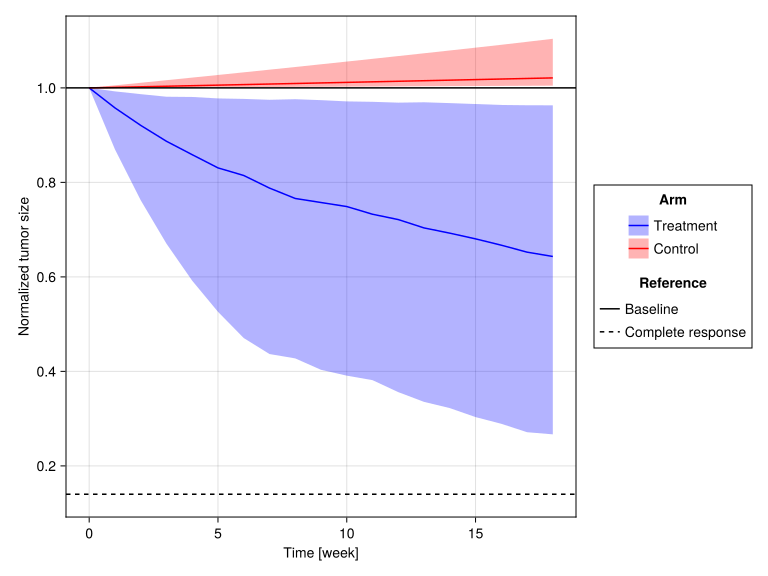
| Median | 1.02 | 0.643 |
7.2 Time Course Summary
time_summary = @by all_results [:time, :arm] @astable begin
    q05, q25, q50, q75, q95 = quantile(:tumor_size, (0.05, 0.25, 0.5, 0.75, 0.95))
    :median = q50
    :q25 = q25
    :q75 = q75
    :q05 = q05
    :q95 = q95
end
sort!(time_summary, [:time, :arm])

simple_table(
    first(time_summary, 10),
    [:time, :arm => "Arm", :median => "Median", :q25, :q75, :q05, :q95],
)| Time (d) | Arm | Median | q25 | q75 | q05 | q95 |
| 0 | Control | 1 | 1 | 1 | 1 | 1 |
| 0 | Treatment | 1 | 1 | 1 | 1 | 1 |
| 7 | Control | 1 | 1 | 1.01 | 1 | 1.06 |
| 7 | Treatment | 0.958 | 0.87 | 0.993 | 0.598 | 1.06 |
| 14 | Control | 1 | 1 | 1.01 | 1 | 1.12 |
| 14 | Treatment | 0.921 | 0.762 | 0.987 | 0.377 | 1.12 |
| 21 | Control | 1 | 1 | 1.02 | 1 | 1.19 |
| 21 | Treatment | 0.887 | 0.67 | 0.981 | 0.257 | 1.19 |
| 28 | Control | 1 | 1 | 1.02 | 1 | 1.27 |
| 28 | Treatment | 0.859 | 0.592 | 0.981 | 0.181 | 1.26 |
7.3 Tumor Dynamics Plot
# Time summary
specs_time_summary = data(time_summary) * mapping(
    :time => (t -> t / 7) => "Time [week]",
    color = :arm => sorter("Treatment", "Control") => "Arm",
) * (
    # IQR band layer
    mapping(:q25, :q75) * visual(Band; alpha = 0.3) +
        # Median line layer
        mapping(:median) * visual(Lines)
)
# Reference lines
specs_references = mapping(
    [1.0, 0.14],
    linestyle = ["Baseline", "Complete response"] => "Reference"
) * visual(HLines)

draw(
    specs_time_summary + specs_references,
    scales(Color = (; palette = [:blue, :red]));
    axis = (; ylabel = "Normalized tumor size"),
)
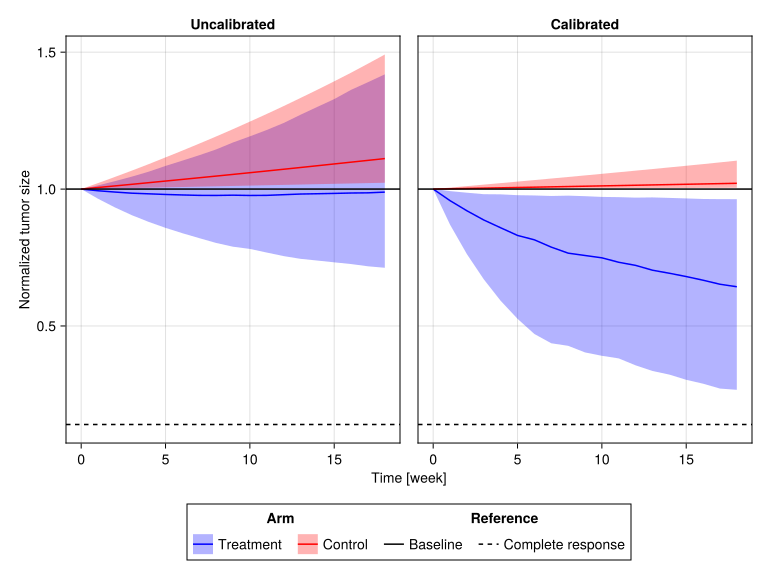
7.4 Calibrated vs Uncalibrated Comparison
To demonstrate the impact of ILP calibration, let us compare tumor dynamics between the calibrated and uncalibrated populations.
We repeat simulations with the uncalibrated virtual population:
# Perform simulations
uncalibrated_treatment_results = simobs(
    tumor_burden_model,
    [Subject(; id, covariates = (; treatment = true)) for id in 1:nrow(vpop)],
    param,
    [(; row.η) for row in eachrow(vpop)];
    obstimes,
    simulate_error = false,
) |> DataFrame
uncalibrated_control_results = simobs(
    tumor_burden_model,
    [Subject(; id, covariates = (; treatment = false)) for id in 1:nrow(vpop)],
    param,
    [(; row.η) for row in eachrow(vpop)];
    obstimes,
    simulate_error = false,
) |> DataFrame
uncalibrated_all_results = vcat(uncalibrated_treatment_results, uncalibrated_control_results; source = "arm" => ["Treatment", "Control"])

uncalibrated_time_summary = @by uncalibrated_all_results [:time, :arm] @astable begin
    q05, q25, q50, q75, q95 = quantile(:tumor_size, (0.05, 0.25, 0.5, 0.75, 0.95))
    :median = q50
    :q25 = q25
    :q75 = q75
    :q05 = q05
    :q95 = q95
end
sort!(uncalibrated_time_summary, [:time, :arm])
# Combine results with arm labels
all_results = vcat(
treatment_results,
control_results;
source = "arm" => ["Treatment", "Control"],
)
# Extract final time points
final = @rsubset(all_results, :time == maximum(obstimes))
table_one(
final,
[:tumor_size => (col -> (median(col) => "Median",)) => "Final Tumor Size"];
groupby = :arm => "Arm",
show_total = false,
)| Arm | ||
| Control | Treatment | |
| Final Tumor Size | ||
| Median | 1.02 | 0.643 |
# Combine data for comparison
comparison_time_summary = vcat(
    time_summary,
    uncalibrated_time_summary;
    source = "population" => ["Calibrated", "Uncalibrated"],
)

# Time summary
specs_time_summary = data(comparison_time_summary) * mapping(
    :time => (t -> t / 7) => "Time [week]",
    color = :arm => sorter("Treatment", "Control") => "Arm",
    col = :population => sorter("Uncalibrated", "Calibrated"),
) * (
    # IQR band layer
    mapping(:q25, :q75) * visual(Band; alpha = 0.3) +
        # Median line layer
        mapping(:median) * visual(Lines)
)
# Reference lines
specs_references = mapping(
    [1.0, 0.14],
    linestyle = ["Baseline", "Complete response"] => "Reference",
) * visual(HLines)

draw(
    specs_time_summary + specs_references,
    scales(Color = (; palette = [:blue, :red]));
    axis = (; ylabel = "Normalized tumor size"),
    legend = (; position = :bottom),
)
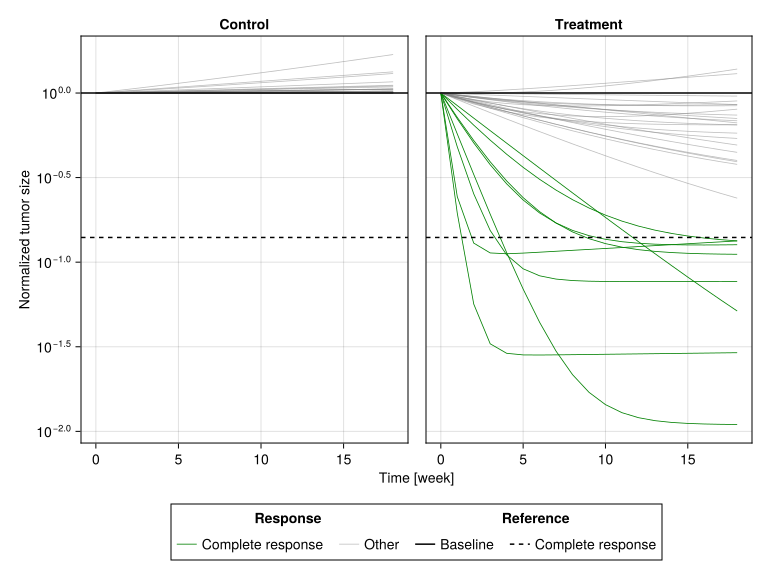
7.5 Individual Trajectories (Spaghetti Plot)
# Sample 30 random patients
sample_ids = sample(unique(treatment_results.id), 30; replace = false)

# Prepare data with response classification
all_data = @chain all_results begin
    @rsubset :id in sample_ids
    @orderby :id :arm :time
    @groupby :id :arm
    @transform @astable begin
        final_tumor_size = :tumor_size[end]
        :response = ifelse.(:arm .== "Treatment" .&& final_tumor_size < 0.14, "Complete response", "Other")
    end
end

# Treatment panel using AoG
specs_data = data(all_data) * mapping(
    :time => (t -> t / 7) => "Time [week]",
    :tumor_size => "Normalized tumor size",
    color = :response => sorter("Complete response", "Other") => "Response",
    group = :id,
    col = :arm => "Arm",
) * visual(Lines, linewidth = 0.8)
# Add reference lines
specs_refs = mapping(
    [1.0, 0.14],
    linestyle = ["Baseline", "Complete response"] => "Reference",
) * visual(HLines)

draw(
    specs_data + specs_refs,
    scales(Color = (; palette = [:green, (:gray, 0.5)]));
    axis = (; yscale = log10),
    legend = (; position = :bottom),
)
8 Part 6: Endpoint Analysis
8.1 Response Classification
Classify all patients:
final_classify = @transform final :response = cut(
    :tumor_size,
    [0.14, 0.7, 1.0];
    labels = ["CR", "PR", "SD", "PD"],
    extend = true,
)
Distribution of responses:
# All responses
all_response = @chain final_classify begin
    @groupby :arm
    @transform :npatients = length(:arm)
    @by [:arm, :response] @astable begin
        npatients = only(unique(:npatients))
        :pct = 100 * length(:response) / npatients
    end
    unstack(_, [:response], :arm, :pct; fill = 0)
end

simple_table(
    all_response,
    [
        :response => "Response",
        :Treatment => "Treatment (%)",
        :Control => "Control (%)",
    ],
)| Response | Treatment (%) | Control (%) |
| CR | 20 | 0 |
| PR | 35 | 0 |
| SD | 25 | 0 |
| PD | 20 | 100 |
8.2 Confidence Intervals
We compute 95% confidence intervals (Clopper-Pearson) for the complete response rate:
# Calculate all response rates with CI using DataFrame operations
response_ci = @chain final_classify begin
    @groupby :arm
    @transform :npatients = length(:arm)
    @by [:arm, :response] @astable begin
        npatients = only(unique(:npatients))
        :rate = 100 * length(:response) / npatients
        :ci = round.(100 .* confint(BinomialTest(length(:response), npatients); level = 0.95); sigdigits = 3)
    end
end

simple_table(
    response_ci,
    [
        :arm => "Arm",
        :response => "Response",
        :rate => "Rate (%)",
        :ci => "95% CI",
    ],
)| Arm | Response | Rate (%) | 95% CI |
| Treatment | CR | 20 | (14.4, 26.6) |
| Treatment | PR | 35 | (28.1, 42.4) |
| Treatment | SD | 25 | (18.9, 32.0) |
| Treatment | PD | 20 | (14.4, 26.6) |
| Control | PD | 100 | (98.0, 100.0) |
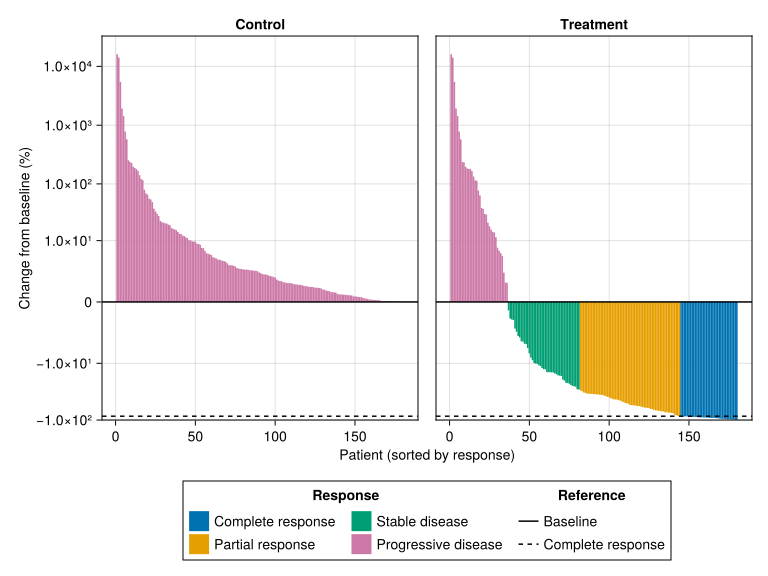
8.3 Waterfall Plot
# Compute ranks of patients
waterfall_data = @chain final_classify begin
    @rtransform :pct_change = 100 * (:tumor_size - 1)
    @orderby -:pct_change
    @groupby :arm
    @transform! :rank = 1:length(:arm)
end

# Data
specs_data = data(waterfall_data) * mapping(
    :rank => "Patient (sorted by response)",
    :pct_change => "Change from baseline (%)",
    color = :response => renamer("CR" => "Complete response", "PR" => "Partial response", "SD" => "Stable disease", "PD" => "Progressive disease") => "Response",
    col = :arm => sorter("Control", "Treatment") => "Arm",
) * visual(BarPlot, gap = 0, fillto = minimum(waterfall_data.tumor_size) / 2)
# Reference lines
specs_references = mapping(
    [0, -86],
    linestyle = ["Baseline", "Complete response"] => "Reference",
) * visual(HLines)

draw(
    specs_data + specs_references,
    axis = (; yscale = Makie.pseudolog10, yticks = [-100, -10, 0, 10, 100, 1000, 10000], limits = (nothing, (-100, nothing))),
    legend = (; position = :bottom, nbanks = 2)
)
8.4 Response Rate Comparison
# Create AoG grouped bar chart
bar_layer = data(response_ci) * mapping(
    :response => renamer("CR" => "Complete Response", "PR" => "Partial Response", "SD" => "Stable Disease", "PD" => "Progressive Disease") => "Response",
) * (
    mapping(
        :rate,
        dodge = :arm,
        color = :arm => sorter("Control", "Treatment") => "Arm",
    ) *
        visual(BarPlot) +
        mapping(:ci => first, :ci => last, dodge_x = :arm) * visual(Rangebars; color = :black, linewidth = 1.5, whiskerwidth = 8)
)

draw(bar_layer; axis = (; xticklabelrotation = π / 4, ylabel = "Rate (%)"))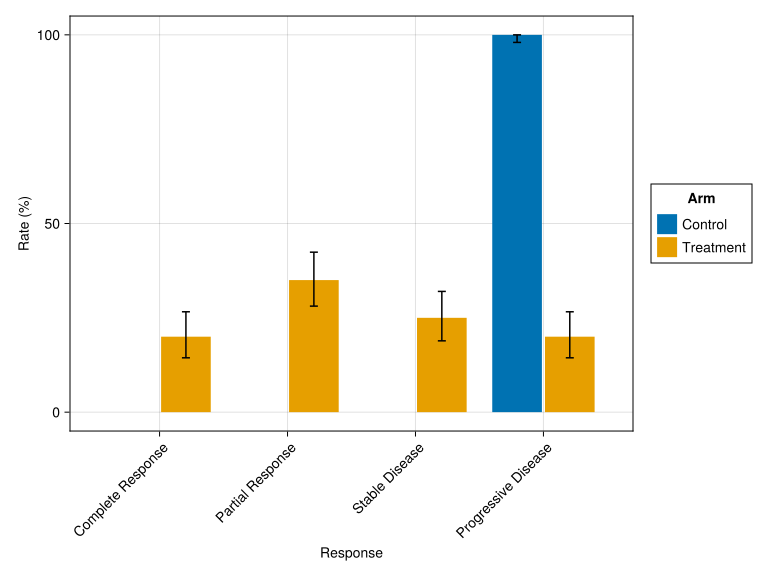
9 Practical Recommendations
TipSample Size Considerations
| Purpose | Recommended n |
|---|---|
| Exploratory | 100-500 |
| Dose-finding | 500-1,000 |
| Pivotal VCT | 1,000-5,000 |
| Regulatory submission | 5,000-10,000 |
TipReproducibility
Always set Random.seed!() at the start of VCT simulations for reproducible results.
10 Summary
10.1 Key Concepts
VCTs simulate clinical trials using models and virtual patient populations
The simulation loop:
- For each VP: Convert parameters → random effects → simulate → collect
Calibration ensures the vpop matches clinical trial characteristics
Endpoint analysis uses bootstrap resampling for confidence intervals
Visualizations include time courses, spaghetti plots, waterfall plots, and response comparisons
10.2 Position in ISCT Workflow
flowchart LR
    A["Step 1:<br/>Model"] --> B["Step 2:<br/>Sensitivity"]
    B --> C["Step 3:<br/>Identifiability"]
    C --> C2["Step 4:<br/>Vpop Generation"]
    C2 --> D["Step 5:<br/>MILP Calibration"]
    D --> E["Step 6:<br/>VCT & Analysis<br/>(This Tutorial)"]

    style E fill:#e8f5e9,stroke:#2e7d32,stroke-width:3px
10.3 Congratulations
You have completed the Tumor Burden Tutorial Series! You now have the skills to:
- Define and understand pharmacometric models
- Generate realistic virtual populations with copulas
- Analyze parameter sensitivity
- Assess structural identifiability
- Calibrate populations to clinical targets
- Run and analyze virtual clinical trials
10.4 References
Cortés-Ríos, J., Magee, M., Sher, A., Jusko, W. J., & Desikan, R. (2025). A step-by-step workflow for performing in silico clinical trials with nonlinear mixed effects models. CPT: Pharmacometrics & Systems Pharmacology. https://doi.org/10.1002/psp4.70122